SafeCheckNow is a product of MKF Technologies LLC, a U.S.-based software company.
Contact: Info@safechecknow.com
SafeCheckNow is a safety and wellness check-in application designed to help individuals stay connected with trusted contacts through a simple daily routine.
Users complete a brief daily check-in using the SafeCheckNow app. If a scheduled check-in is missed, the system automatically sends a transactional SMS notification to designated contacts so they are aware and can follow up if needed.
How It Works
- Users create an account and designate trusted contacts
- Users complete a simple daily check-in using the SafeCheckNow app
- If a scheduled check-in is missed, a transactional SMS notification is sent to the selected contacts
Messages are sent only in response to user activity or inactivity and are non-promotional.
Who It's For
SafeCheckNow is designed for individuals and families who want a simple, reliable way to confirm daily well-being, including:
- People who live alone
- Individuals who want an added layer of personal safety
- Families or trusted contacts seeking peace of mind
Messaging & Consent
- SMS messages are user-initiated
- Message recipients are explicitly designated by the user
- Messages are informational and safety-related only
- No marketing, advertising, or promotional messages are sent
HOW CONSENT IS OBTAINED
SafeCheckNow uses an explicit, user-initiated opt-in process within the mobile application. Consent is obtained when users add emergency contacts through the following steps:
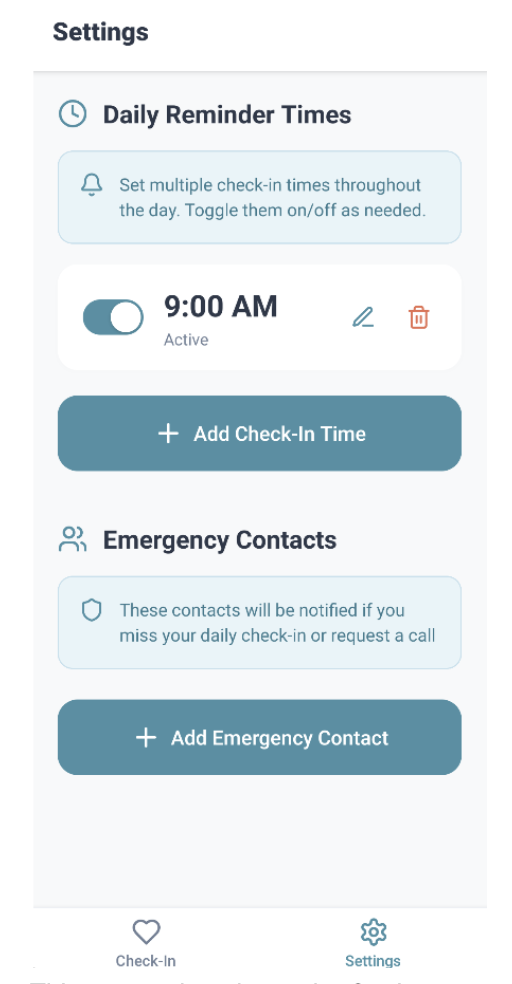
- User Navigation: Users open the SafeCheckNow mobile app and navigate to the Settings screen, where they access the "Emergency Contacts" section.
- Informed Consent Disclosure: Before adding contacts, users see a clear information card that states: "These contacts will be notified if you miss your daily check-in or request a call." This disclosure makes users aware that adding a contact will result in SMS notifications being sent to that contact.
- Contact Addition Process:
- Users tap the "Add Emergency Contact" button
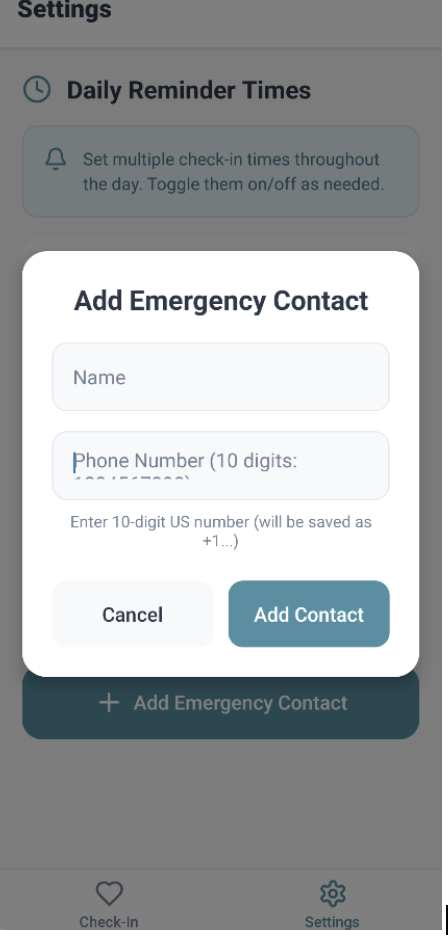
- A modal form appears where users enter:
- Contact Name (e.g., "John Doe")
- Contact Phone Number (10-digit US number, automatically formatted as +1...)
- Users review the information and tap "Add Contact" to save
- Explicit Consent: By completing the "Add Contact" action, users provide explicit consent that:
- The entered phone number may receive SMS messages
- Messages will be sent for safety and wellness purposes only
- Messages are transactional and triggered by specific user actions or missed check-ins
- No marketing or promotional messages will be sent
WHAT MESSAGES CONTACTS RECEIVE
Emergency contacts receive SMS messages in the following scenarios:
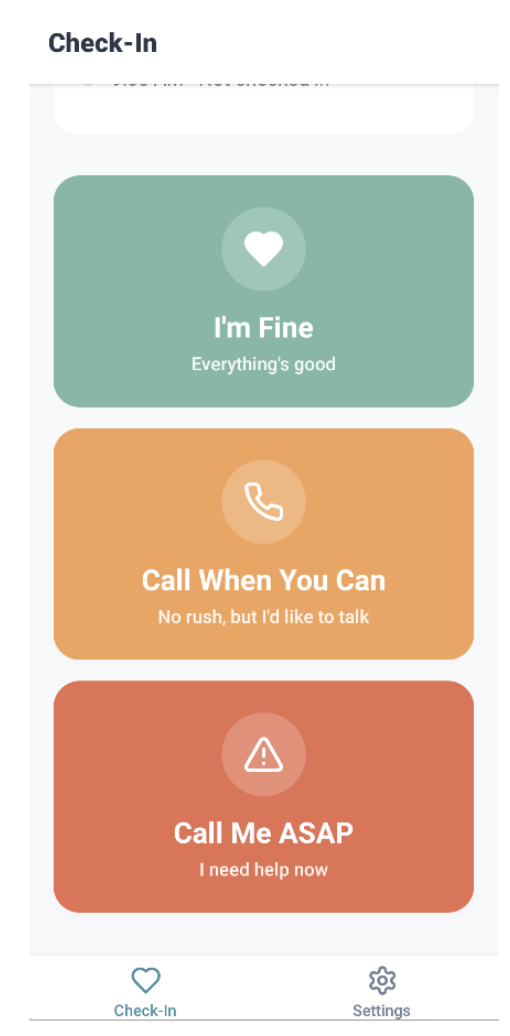
- User Requests Immediate Assistance: When a user completes a check-in and selects "Call Me ASAP", contacts receive:
- User Requests a Callback: When a user completes a check-in and selects "Call When You Can", contacts receive:
- Missed Check-In Alert: If a user misses a scheduled daily check-in, contacts receive:
All messages are transactional, safety-related, and user-initiated. No marketing, advertising, or promotional content is ever sent.
Message frequency varies. Message and data rates may apply. Reply STOP to opt out.
Application Screenshots
This screenshot shows the Settings screen with the "Emergency Contacts" section visible, including the information card that states "These contacts will be notified if you miss your daily check-in or request a call" and the "Add Emergency Contact" button.
This screenshot shows the modal form that appears when users tap "Add Emergency Contact", displaying the name input field, phone number input field with helper text "Enter 10-digit US number (will be saved as +1...)", and the Cancel/Add Contact buttons.
Business Information
SafeCheckNow is a product of MKF Technologies LLC
A U.S.-based software company
Contact: Info@safechecknow.com
MKF Technologies LLC
12191 Glen Bay Dr
Wellington, FL 33414